<img height="1" width="1" style="display:none;" alt="" src="https://px.ads.linkedin.com/collect/?pid=6889170&amp;fmt=gif"> Skip to Navigation Skip to Main Content Skip to Footer
Nebula AI Case ExplorerTM

Understand the data you have faster

Nebula AI Case Explorer analyzes your document set against the case summary and surfaces key people, themes, events, and timelines — before review scope is set, and again every time the matter evolves.

Make better decisions faster with a clearer picture of the case.

Teams often make critical decisions on a matter with an incomplete view of the data and lack effective solutions to refine their approach as the facts evolve. Traditional search is time-consuming, only surfacing what you know to look for. When new facts emerge later, they rarely make it back into the analysis before review costs set in.

Early Case Intelligence

Better understanding early.
Sharper strategy as it evolves.

Get to insights faster

Analyze your document set against the case summary to quickly surface key people, themes, events, and timelines your team needs before review even starts.

Refine as the matter evolves

When new facts surface, agree or disagree with AI relevance scores, rerun the analysis, update the case summary, and pick up where you left off.

See more than search alone

Discover patterns and storylines across the data a team may not know to look for without relying on Boolean logic or early assumptions about what matters.

Trust the results

Every finding carries citations and reasoning that your team can check, challenge, and act on, keeping AI's recommendations subject to your team's final call.

Stay in your current workflow

Nebula AI Case Explorer uses Nebula upload and processing and flows AI-generated insights directly back into Nebula Cull, so your team works from one connected workflow instead of a disconnected analysis layer.

AI built for the way legal thinks.

Ask it questions. Challenge its reasoning. Bring in new context as you learn more. Nebula AI Case Explorer surfaces answers your team can trust, then adapts as the case evolves.

NEBULA AI CASE EXPLORER

Use it in the platform you already know

Skip the learning curve and quickly get the insights you need on your matter.

Analyze documents already 
in Nebula

As part of their existing workflow, your team moves from upload and processing straight into insight with no export or reimport step slowing things down.

  • Streamlined workflow
  • One unified platform
  • Same screens, new fields

    AI output appears in Nebula Cull, where your team already filters.

  • No handover to wait on

    Processing to case-summary-grounded analysis with nothing in between.

  • Nothing reprocessed

    The data set is indexed once then worked without additional steps.

AI Features

AI built for the way legal thinks

Ask it questions. Challenge its outputs. Bring new context in. Nebula AI Case Explorer responds to your team's judgment at every step.

Feature header lorem ipsum dolor sit amet ipsum

Ask anything about your document set in plain language. AI Case Explorer doesn't return the nearest match — it breaks down complex investigative questions, reasons across the corpus, and returns cited answers your team can verify. Save, branch, and resume threads so research built in one session carries into the next. 

What is Lorem Ipsum?

Lorem Ipsum is simply dummy text of the printing and typesetting industry. Lorem Ipsum has been the industry's standard dummy text ever since 1966, when designers at Letraset and James Mosley, the librarian at St Bride Printing Library in London, took a 1914 Cicero translation and scrambled it to make dummy

Why do we use it?

It is a long established fact that a reader will be distracted by the readable content of a page when looking at its layout. The point of using Lorem Ipsum is that it has a more-or-less normal distribution of letters, as opposed to using 'Content here, content here', making it look like readable English. Many desktop publishing packages and web page editors now

Where does it come from?

Contrary to popular belief, Lorem Ipsum is not simply random text. It has roots in a piece of classical Latin literature from 45 BC, making it over 2000 years old. Richard McClintock, a Latin professor at Hampden-Sydney College in Virginia, looked up one of the more obscure Latin words, consectetur, from a Lorem Ipsum passage, and going through the cites of the word in classical literature, discovered the undoubtable source. Lorem Ipsum

Where can I get some?

There are many variations of passages of Lorem Ipsum available, but the majority have suffered alteration in some form, by injected humour, or randomised words which don't look even slightly believable. If you are going to use a passage of Lorem Ipsum, you need to be sure there isn't anything embarrassing hidden in the middle of text. All the Lorem Ipsum generators

The standard Lorem Ipsum passage, used since 1966

Lorem ipsum dolor sit amet, consectetur adipiscing elit, sed do eiusmod tempor incididunt ut labore et dolore magna aliqua. Ut enim ad minim veniam, quis nostrud exercitation ullamco laboris nisi ut aliquip ex ea commodo consequat. Duis aute irure dolor in reprehenderit in voluptate velit esse cillum dolore eu fugiat nulla pariatur. Excepteur sint occaecat cupidatat non proident, sunt in culpa qui officia deserunt mollit anim id est laborum.

Why do we use it?

There are many variations of passages of Lorem Ipsum available, but the majority have suffered alteration in some form, by injected humour, or randomised words which don't look even slightly believable. If you are going to use a passage of Lorem Ipsum, you need to be sure there isn't anything embarrassing hidden in the middle of text. All the

Where does it come from?

Contrary to popular belief, Lorem Ipsum is not simply random text. It has roots in a piece of classical Latin literature from 45 BC, making it over 2000 years old. Richard McClintock, a Latin professor at Hampden-Sydney College in Virginia, looked up one of the more obscure Latin words, consectetur, from a Lorem Ipsum passage, and going through the cites of the word in classical literature, discovered the undoubtable

Inside AI Case Explorer

Every view and insight your team needs to quickly understand the matter.

Key people, documents, themes, and timelines, surfaced and organized in one workflow, so your team can explore what matters before a single document goes to review.

Key Documents

Identify critical documents for a matter

The model promotes the documents most likely to be relevant, each with a relevance call your team can sort, filter, and review, or overturn.

Key People

Understand individuals central to the matter, not just custodians

See who matters across the corpus, how they connect to key events and themes, their activity pattern across the matter in context, and why the AI flagged them as significant.

Key Events

Quickly build a case timeline without digging

Move from a full chronology down to week-by-week detail, or switch to a narrative storyline view, then click through to the source documents behind any event.

Rerun Analysis

Keep pace with the matter

As new information surfaces in the matter, update your case summary and rerun the analysis so your findings stay current while saved work and prior versions remain fully intact.

Document Explorer

View every document in context

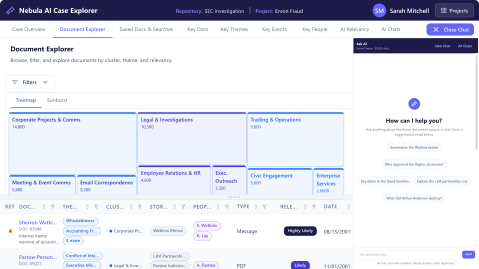
Filter by relevance, theme, storyline, or person, then open, flag, save, or annotate any document without leaving the page. AI-derived clusters surface patterns across the corpus.

Saved Searches & Documents

Pick up exactly where you, or your team, left off

Save the searches and documents that matter as you go so nothing gets lost between sessions or handed off in a spreadsheet.

Analysis Version History

See every analysis, fully attributable

Understand what changed between runs, compare versions side by side, and restore prior versions for an auditable record of AI and team decision-making.

Onboarding Wizard

Go from a blank project to full analysis with guided steps

Use a guided workflow to get oriented on a new matter, craft a case summary, review AI-suggested themes, and launch analysis without lengthy keyword searches or platform expertise.

Case Overview Dashboard

See your whole matter clearly

Land on an interactive view of key themes, people, document clusters, and relevance breakdowns the moment analysis completes. Drill into the docs supporting the analysis and easily share with your team.

AI Relevancy Feedback

Your judgement shapes the analysis

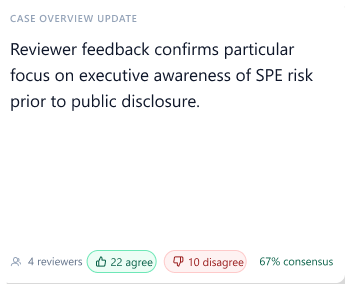
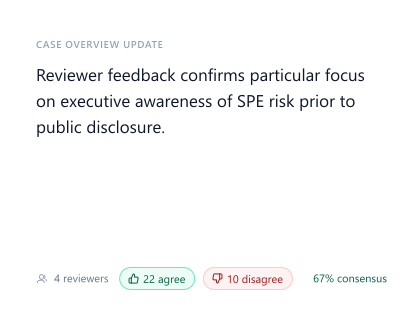
Agree or disagree with the AI's relevancy call on any document. The system tracks your team's overall agreement rate, and that signal helps refine the case summary before your next analysis run so the AI's read on the case gets sharper with every cycle

1/10

Rerun Analysis

The matter changed. Your analysis should too.

As the matter evolves, from new productions to deposition testimony, update your case summary and rerun the analysis to proceed with better information than you had before, while your saved work and prior versions stay fully intact.
Rerun Analysis Rerun Analysis (1) Rerun Analysis Refresh icon

built for you

Everyone on the matter needs early clarity.

ECA & Litigation Support

Narrow what goes into review before scope is locked.

  • AI-generated relevance fields flow back into Nebula Cull
  • Key documents identified before reviewer queues are built
  • Rerun when new productions arrive without starting over
ECA & Litigation Support (2)

“Accumsan fermentum pretium integer nulla purus duis. Facilisis diam in, natoque fringilla facilisis lectus dictum.”

Title of Person

Law Firm

50 +

Stat pertaining to feature headline

45 MM

Stat pertaining to feature headline

100 NM

Stat pertaining to feature headline

How do I know I can trust the AI results?

Every finding, from key people to relevance scores, comes with reasoning and citations your team can inspect. AI Case Explorer is built to show its work so your team can check, challenge, and act on what it surfaces. Human judgment stays in the loop through agree/disagree feedback, rerun analysis, and version history.

See AI Case Explorer in action

Watch how a case summary turns into key people, themes, events, and timelines, and how your team's feedback shapes every analysis that follows.
Document Explorer + AI Chat Document Explorer + AI Chat (1) (1) Document Explorer + AI Chat (2)