
New Feature: Invoices
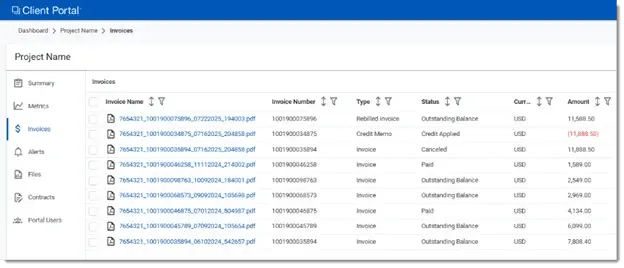
This feature is available to Project Admins and Advanced Users and accessible via a dedicated Invoices view within Client Portal. This view provides a centralized location for reviewing and managing project invoices.
Automatic Upload of Approved Invoices
-
Approved invoices are automatically uploaded to the Client Portal.
Dashboard-Style Interface
-
A user-friendly dashboard allows for advanced filtering and sorting, similar to the main Client Portal dashboard. Users can easily display, sort, and filter invoice data.
PDF Downloads
-
Users can download individual or multiple invoices in PDF format.
Invoice Renaming
-
Invoices can be renamed directly within the interface for better organization and clarity.
CSV Export
-
Export data from the Invoice view to review in Comma Separated Values (CSV) format.
Alerting Support
-
Existing alerting functionality now supports notifications for new invoice uploads.
Update: Billing Folder Relocation
-
The Billing folder has been relocated and archived under Files.
.webp?width=430&height=346&name=download%20(1).webp)
Bug Fixes & Improvements
This release also includes various bug fixes to improve overall stability and user experience across Client Portal.
Learn more about available invoices by visiting: Invoices Overview