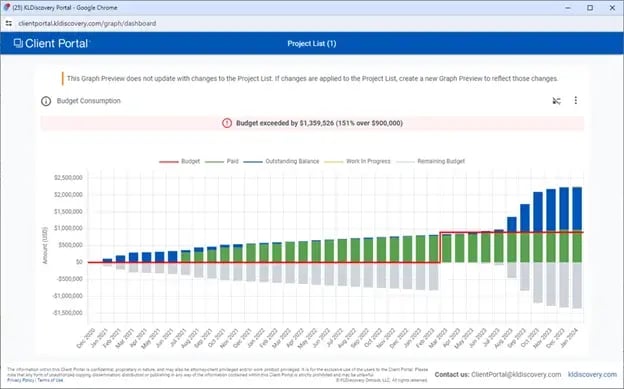
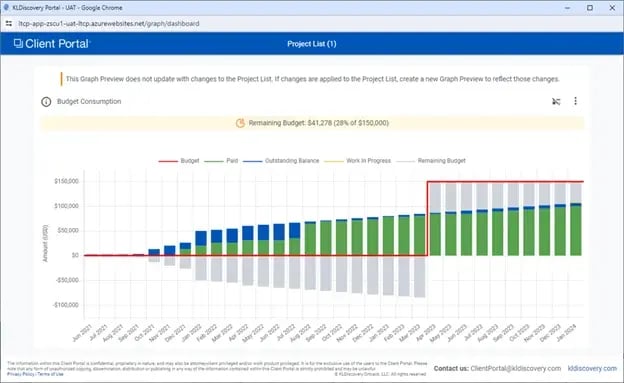
A new metric tile for “Budget Consumption” is now available. This chart will track project performance – including work in progress – to budget. The series of the chart will break down their overall spend into the following categories: Paid, outstanding, WIP, & Remaining Budget. If budget information is changed over time, the budget line will be “stair stepped” to show that change. The chart will also have a “health bar” at the top to give an immediate visual indicator of how they are performing to budget (no bar = 31% or more budget remaining, yellow = less than 30% remaining, red = over budget).
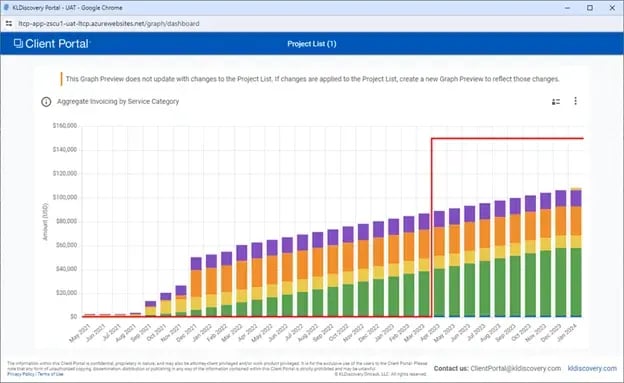
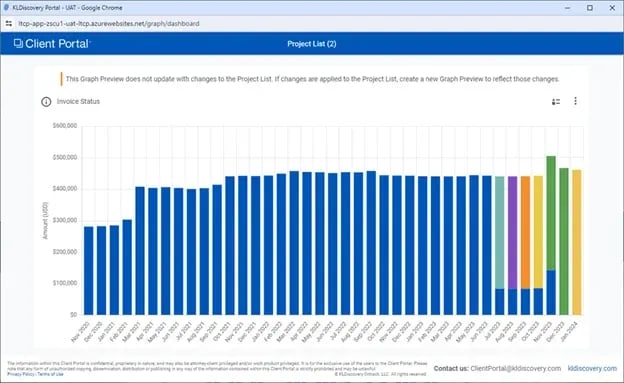
Work in progress now displays on additional metric tiles. It’s default color scheme is yellow with red stripes and now displays on the “invoice status” and “Aggregate Invoicing” metric tiles.
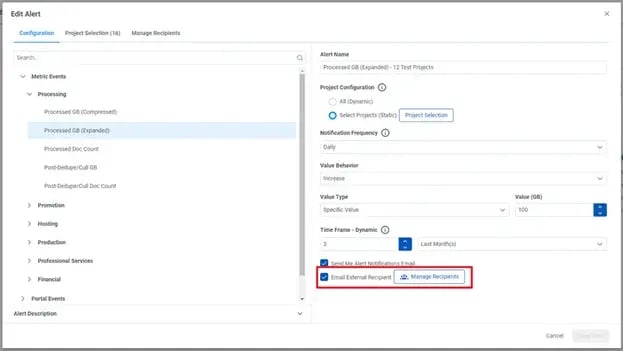
Alerts can now be sent to external recipients. Up to now, users can only choose to notify themselves by email when an alert has been triggered. Now, portal users can input the email address for other people who should receive this alert. This is particularly useful for scenarios where a distribution list (such as a project distro or a team distro) at the law firm needs to be notified as well as for important updates for people who otherwise may not need to access Client Portal regularly, but will benefit from the proactive updates KLDiscovery’s Client Portal Alerting provides (i.e. budget performance, work in progress updates).